Stream Tracing with OpenTelemetry
Akka.Streams can propagate OpenTelemetry trace context through stream pipelines. When enabled, each stage in a graph emits a System.Diagnostics.Activity span parented to the producer's trace. This works across fan-in merges, fan-out broadcasts, and async stage boundaries where AsyncLocal<Activity> would normally be lost.
Watch the Demo
▶ Watch on YouTube — Debug Akka.Streams in Production with OpenTelemetry
Enabling Stream Tracing
Stream tracing is opt-in. Register the "Akka.Streams" ActivitySource with your OpenTelemetry TracerProvider:
using OpenTelemetry;
using OpenTelemetry.Trace;

var tracerProvider = Sdk.CreateTracerProviderBuilder()
    .AddSource("Akka.Streams") // enable Akka.Streams stage spans
    .AddSource("MyApp")        // your own application spans
    .AddJaegerExporter()       // or any OTLP-compatible exporter
    .Build();
When no listener is registered, the instrumentation is a no-op: zero allocations, zero overhead. You can ship this in production and pay nothing unless you wire up a listener.
How It Works
Trace context is captured per-element at the stream boundary (when external code calls OfferAsync, Tell, or any GetAsyncCallback-based ingress) and carried alongside each element through the GraphInterpreter. As each element flows through a stage, the interpreter starts a stage-scoped Activity with the captured context as parent, so downstream stages and any user code running inside them parent their own spans correctly.
So a SqlClient.ExecuteAsync or HttpClient.SendAsync inside a SelectAsync body will produce spans that are children of the SelectAsync stage span, which is itself a child of the producer's trace. The entire chain shares one TraceId.
What Gets Traced
- Linear pipelines:
Source.Queue→Select→SelectAsync→Sink— each stage becomes a span in a parent-child chain. - Fan-in stages (
Merge,Concat,BatchWeighted,GroupedWithin): the first input element's trace becomes the primary parent; additional inputs are attached asActivityLinks so trace viewers can navigate between contributing traces. - Fan-out stages (
Broadcast,Balance): the upstream trace context propagates to every downstream branch.
What Does NOT Get Traced
- Background streams with no producer context: a
Source.TickorSource.Frompipeline with no external traced caller emits zero spans. This prevents long-lived background streams from accumulating unbounded orphan spans. - StreamRef hops: trace context does not currently cross
SourceRef/SinkRefnetwork boundaries. Local-node traces work; cross-node traces stop at the wire boundary.
Example: Batched Fan-in Pipeline
Below is a pipeline where twelve concurrent producers offer orders into a Source.Queue. BatchWeighted merges groups of five into a single outbound HTTP POST:
var orderQueue =
  Source.Queue<Order>(100, OverflowStrategy.DropNew)
    .Select(Normalize)
    .BatchWeighted(
        max: 5L,
        costFunction: _ => 1L,
        seed: o => new List<Order> { o },
        aggregate: (acc, o) =>
        {
            acc.Add(o);
            return acc;
        })
    .SelectAsync(1, async batch =>
    {
        using var resp = await httpClient
            .PostAsync("anything?batch=1", Serialize(batch));
        return batch;
    })
    .ToMaterialized(
        Sink.Ignore<List<Order>>(),
        Keep.Left)
    .Run(_materializer);
The resulting trace in Jaeger shows every stage as its own span, parented correctly. The SelectAsync span carries ActivityLink references back to each contributing producer's trace:
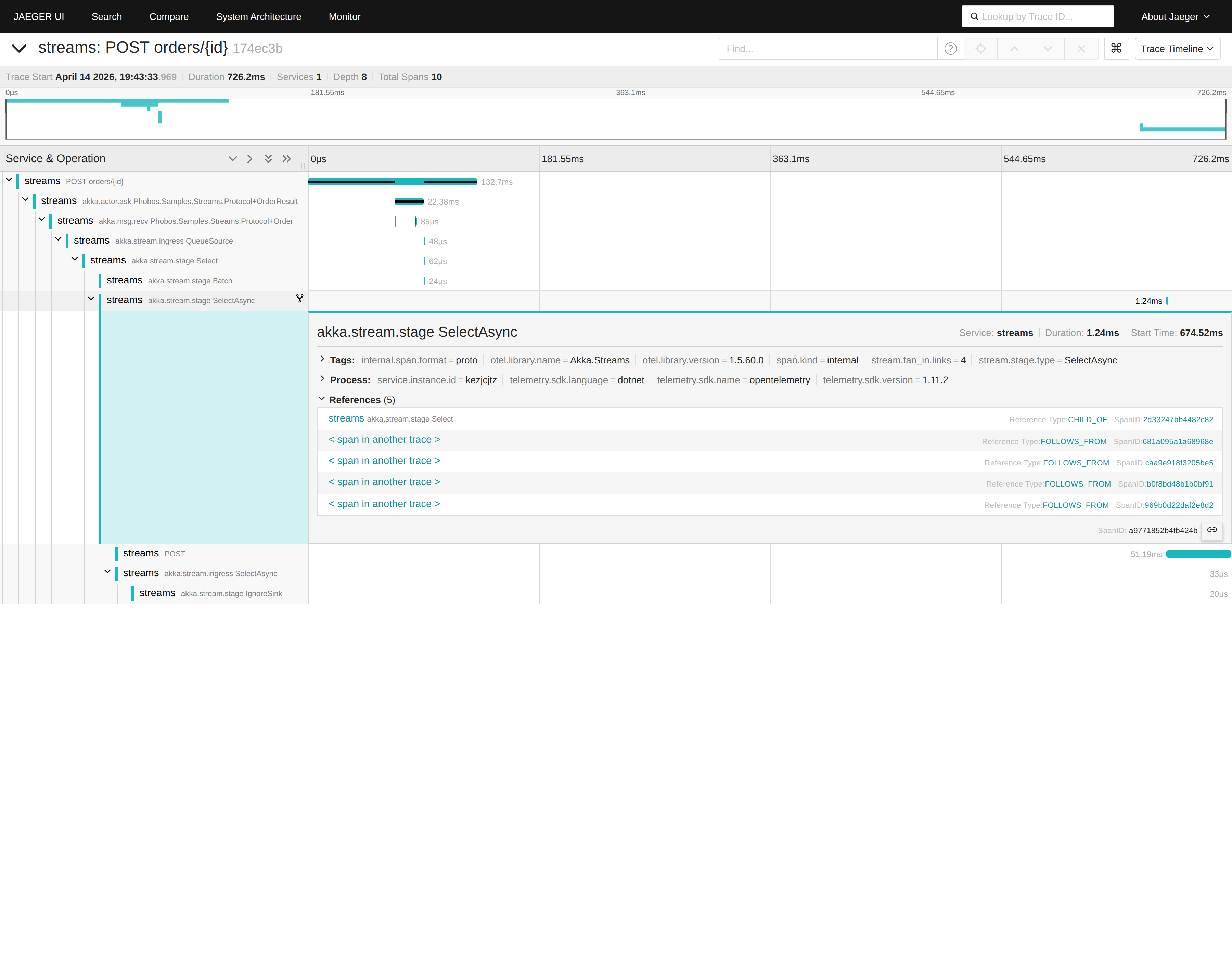
Things to notice:
- The span tree is one trace from ingress through
Select,Batch,SelectAsync, and out to theHttpClient POST. - The
stream.fan_in.linkstag shows how many cross-trace links the span carries. - The References section shows
CHILD_OFpointing to the localBatchspan (normal parent/child), plusFOLLOWS_FROMentries pointing to spans in other traces. Jaeger renders OpenTelemetryActivityLinkasFOLLOWS_FROM.
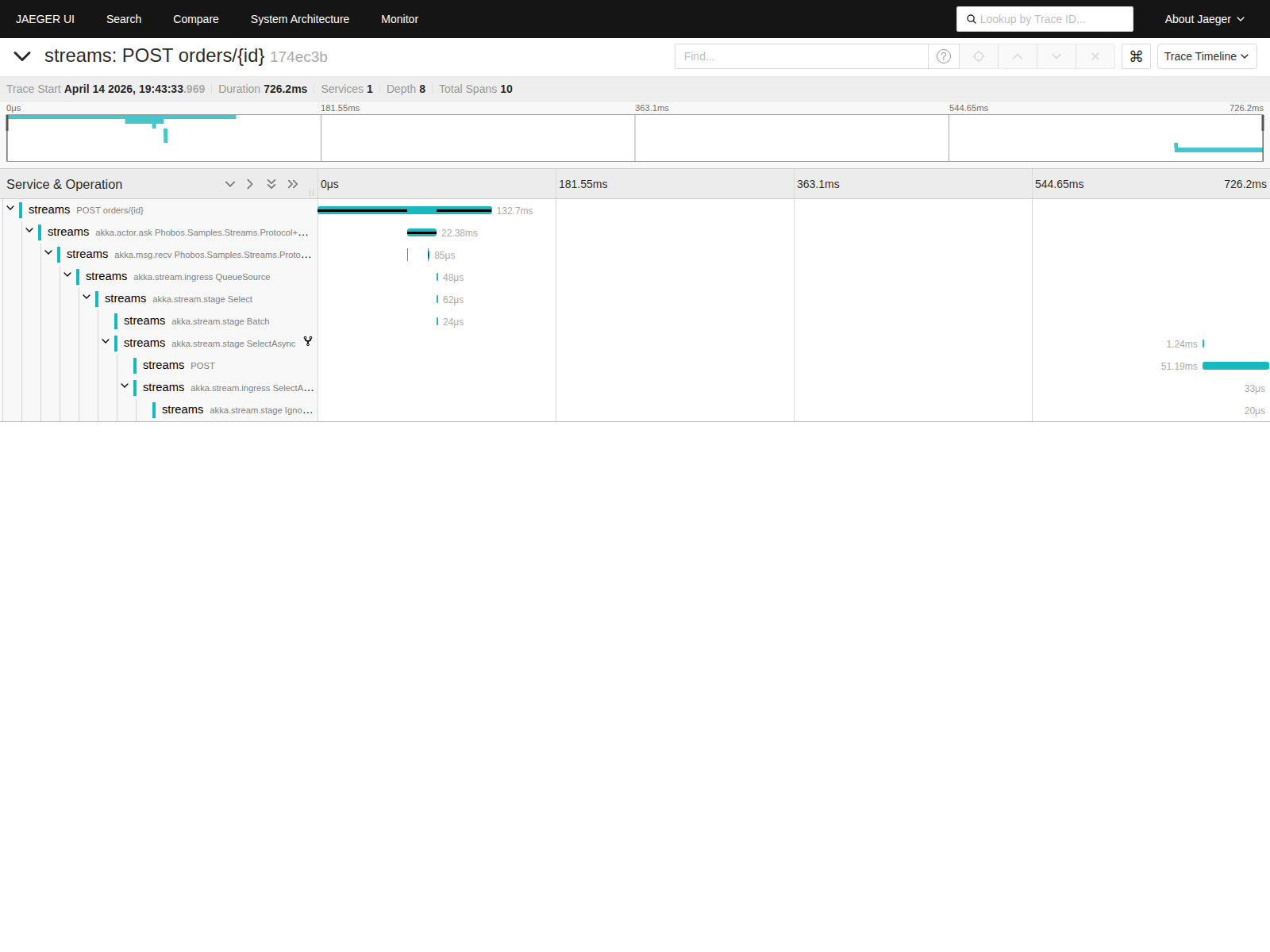
Full Span Tree
The complete span tree without the detail panel expanded:
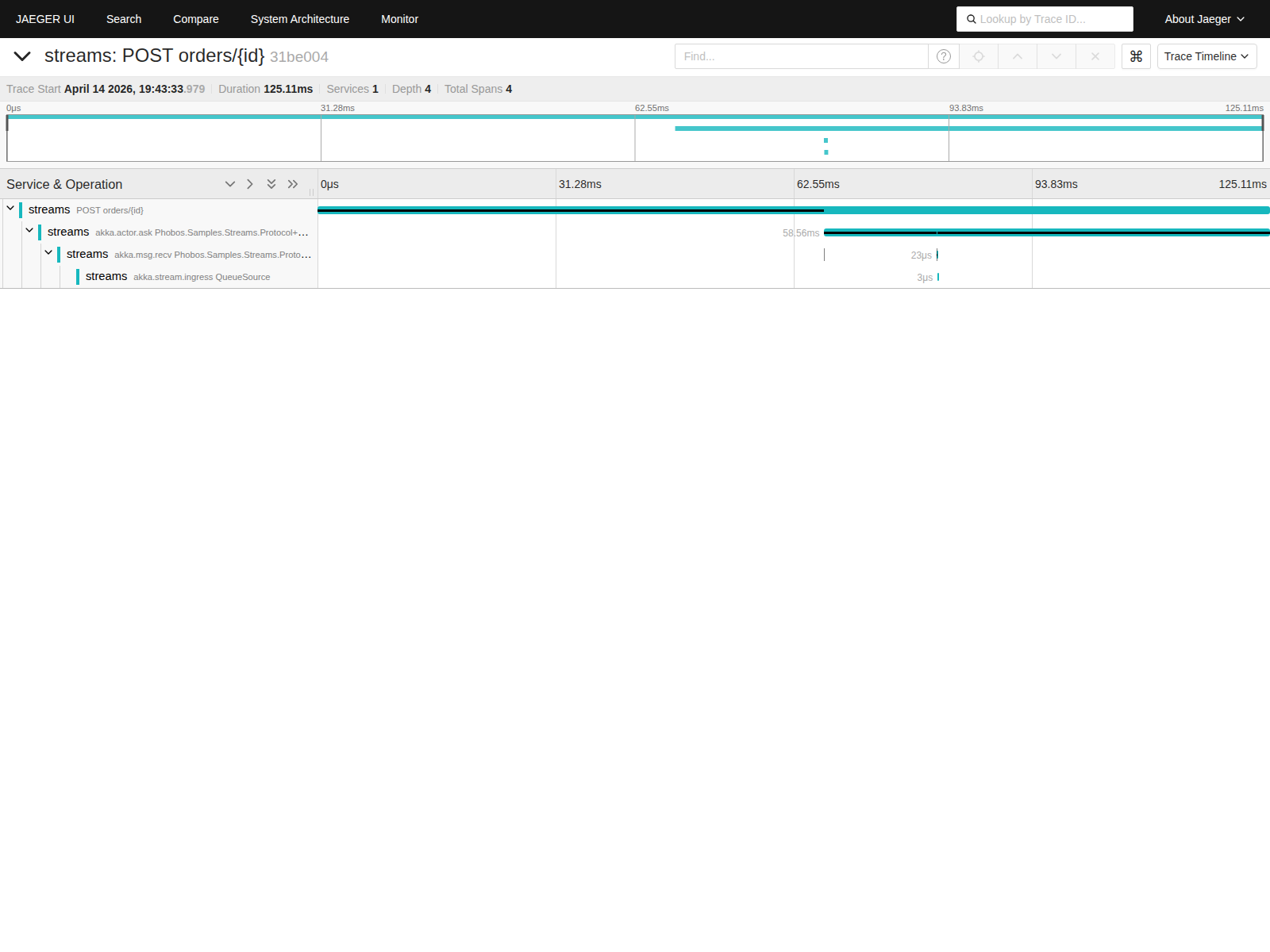
Single Contributing Trace
A request whose element got batched into the flush above. Its own trace stops at the ingress. The downstream Select / Batch / SelectAsync work lives on the merged-batch trace, reachable via the FOLLOWS_FROM link:
Fan-in Semantics
When multiple traced inputs merge into a single output element (e.g., BatchWeighted aggregating N elements into one batch), the framework uses first-wins semantics:
- The first input element's
ActivityContextbecomes the primary parent of the downstream stage span. - All subsequent input elements' contexts are attached as
ActivityLinks on that span.
This prevents trace explosion from N:1 merges without losing observability. Any trace viewer that supports ActivityLink (Jaeger, Zipkin, Azure Monitor) can navigate from any contributing producer's trace to the shared downstream work.
For 1-to-1 pass-through fan-in stages like Merge and Concat, each output element carries exactly the trace context of its single contributing input, so no ActivityLinks are needed.
Using with Phobos
Phobos is Petabridge's commercial observability product for Akka.NET. When used with stream tracing, Phobos adds two things:
- Actor-to-stream trace continuity: Phobos propagates trace context across the actor mailbox boundary, so traces that start in an actor's
OnReceivehandler flow into any stream materialized within that actor. - Automatic instrumentation of actor message handling, persistence operations, and cluster communications. Stream tracing extends that coverage into streaming pipelines.
Stream tracing works independently of Phobos. Any code that sets Activity.Current before calling into a stream ingress point (ASP.NET Core controllers, BackgroundService workers, user-owned ActivitySource scopes) will produce correctly parented traces on its own.
Configuration
Stream tracing requires no HOCON configuration. It activates when a listener is registered on the "Akka.Streams" ActivitySource. The ActivitySource name is available programmatically:
using Akka.Streams.Implementation;

// Use this constant when registering the source
var sourceName = StreamsDiagnostics.ActivitySourceName; // "Akka.Streams"
 Edit this page